


ehweil
Scene
Make your life easier.
Sehweil scenes make your life easier by handling repetitive tasks for you. They save time, reduce effort, and help everything run smoothly in the background, so you can focus on what really matters instead of doing the same things over and over.
Easier your life.
Sehweil scene make your life easier by handling repetitive tasks for you. They save time, reduce effort, and help everything run smoothly in the background, so you can focus on what really matters instead of doing the same things over and over.

Easy as this.
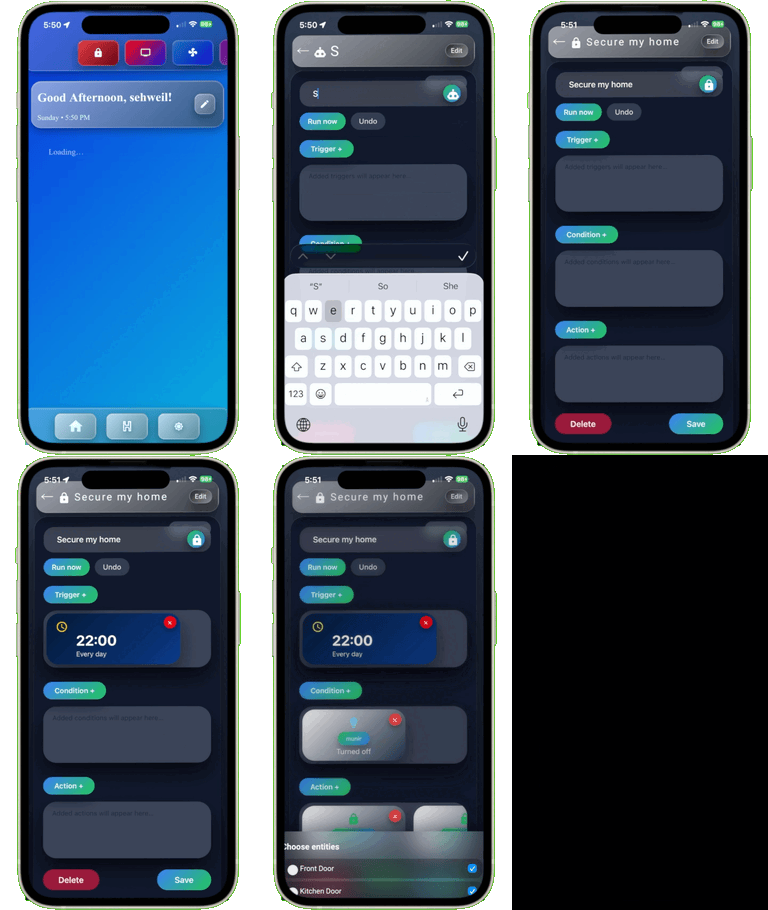
Creating Sehweil scene with the Sehweil PWA is simple and intuitive. The app guides you step by step, letting you choose your devices, set conditions, and define actions without any technical complexity. With a clean interface and smart suggestions, you can build powerful scenes in just a few taps—turning everyday routines into seamless, hands-free experiences.
style your life with Sehweil scenes.
Sehweil OS now give you the chance to start crafting home scenes based on your preferences with total control of your home routine without anyone knowing your daily routine because Sehweil OS is totally private and local it stays in your home.

How easy is it?
While Sehweil OS is not the first platform to bring scenes to smart home world, but it's the first to provide a private , easy to use app and inclusivity in one place, the following section will explain how easy it is to create your scenes in Sehweil PWA


Go to settings icon from Sehweil PWA ( bottom bar ).
Click on Art-HuB icon on the top bar.


Click on Create a new scene.

And now start crafting your scene.
Built-in Home Assistant.

Every Sehweil OS comes equipped with Home Assistant built-in the system, giving you the power to add devices and integrations as well as get creative with crafting your scenes and automations in Home Assistant engine for More advanced options
Get creative with home assistant scene engine.
Sehweil OS is for giving you control and power over your data, but it also gives you the power to control and craft your scene with advanced Home Assistant engine.

Go to settings icon from Sehweil PWA ( bottom bar ).


Click on Art-HuB icon on the top bar.


Click on Advanced scene.


And just like that you are creating your scene using home assistant engine inside Sehweil PWA.
Fixed scenes for easier life

Night time

Movie

Arriving

Leaving
Creating scenes in the Sehweil app is effortless and flexible. You can combine multiple devices and settings into a single scene that matches your mood or routine, then activate everything at once with a tap or a voice command. Whether it’s setting the perfect lighting for the evening or preparing your home for leaving or arriving, scenes make it easy to personalize your space and keep everything working together smoothly.

Also easy as this.
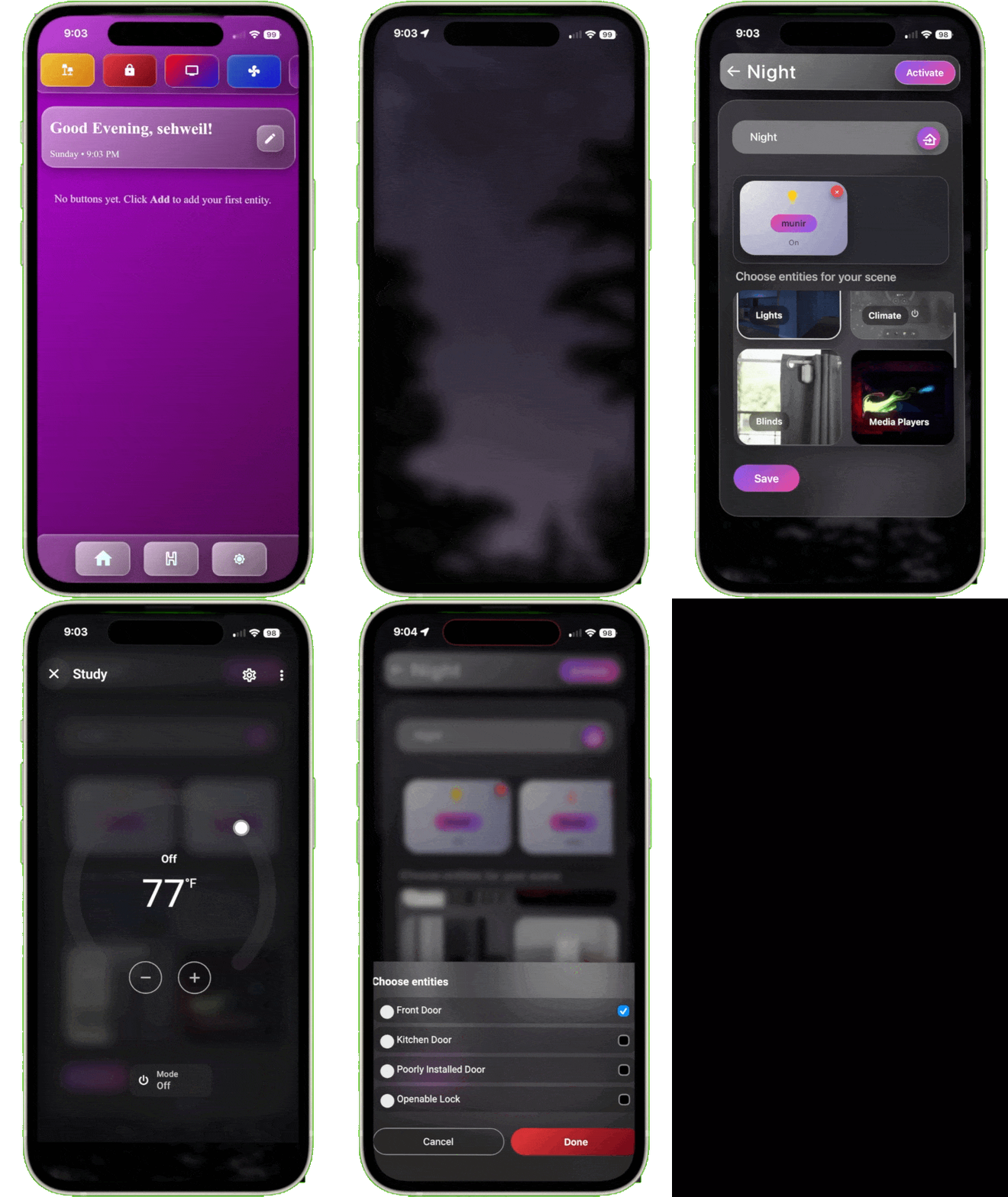
Creating a Night Scene makes your life easier by preparing your home for rest with a single action. Instead of adjusting lights, locking doors, and changing settings one by one, the Night Scene does everything automatically—dimming or turning off lights, setting the perfect temperature, and creating a calm, secure environment. It saves time, reduces mental effort, and helps you unwind knowing your home is already taken care of.
Get creative with home assistant scene engine.


Fixed scenes help HIND react better to activate the scene, for example good night will activate the night scene.
Easy to create fixed scenes in Sehweil PWA.
Sehweil PWA has easy pass for you to create your fixed scene .
Sehweil scene saves you money.

Sehweil scene saves you up to 25% of your electric use. scene makes you automate and style your home so that devices work only when you need them.